WorkflowDaily tooling / 2026
Herdr: tmux for agents
Part of my daily workflow. Agent terminals, Lazygit, Neovim, and the context around them, together in one workspace.
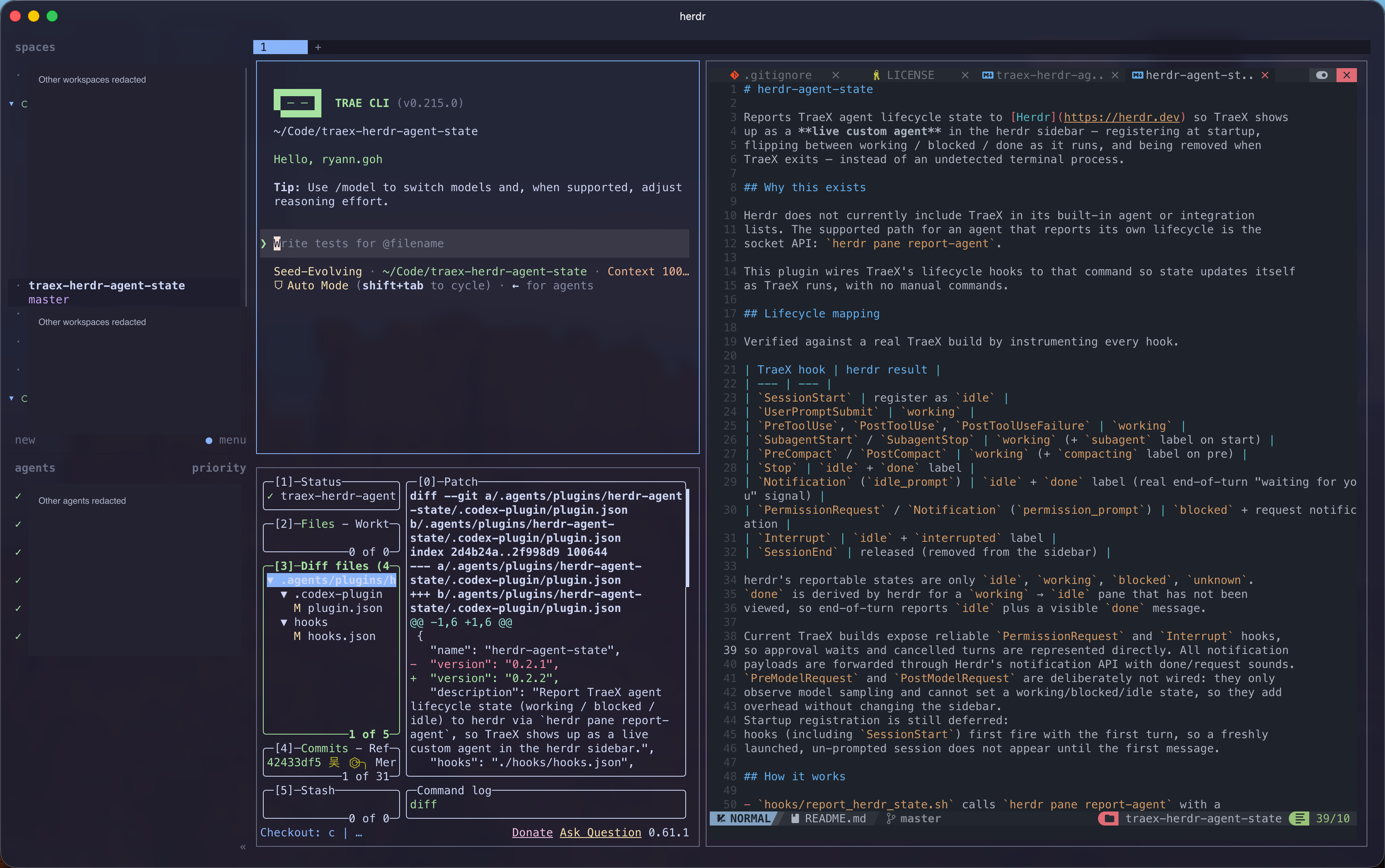
Tmux for agents, in my daily workflow
Herdr TUI is part of my daily workflow. I think of it as tmux for agents: a terminal multiplexer that understands there are coding agents running inside it.
What I like is that the agent is not the entire interface. There is room for the code, the diff, and the commands I need around it. Herdr keeps those terminals organized in workspaces and tabs, with agent status visible in the sidebar.
This is the terminal-based Herdr shown in the screenshot, not its newer native app. I run it inside Ghostty, alongside the terminal tools I already use.
My usual tools, in real panes
A coding agent
TraeX runs in the upper-left pane. I can give it a task and see its terminal output without losing sight of the rest of the workspace. Other agent sessions and projects remain accessible through Herdr’s sidebar.
Lazygit for the changes
Lazygit sits underneath the agent. It gives me a place to inspect changed files and patches, stage selected changes, and work with commits and branches.
That pairing is useful: the agent’s output tells me what it says it did, while the Git diff shows what actually changed. I can review the patch before deciding what belongs in a commit.
Neovim for the code and notes
Neovim occupies the right-hand pane. In this screenshot it is editing the integration’s README; the same pane can hold source code, configuration, or notes.
Herdr does not need to replace my editor. It lets the editor, the agent, and the Git view sit next to each other. I can read an implementation, make a small edit, or update documentation in the same workspace.
A shell for checks
Another terminal pane can run tests, builds, a development server, or a command-line tool. These are ordinary terminal programs, not special Herdr plugins.
An agent finishing is not the same as a reviewed change. Keeping the diff, editor, and checks close together makes that review a natural next step.
Knowing what needs attention
Herdr’s agent sidebar is the part that makes this more than a collection of split terminals. It can show an agent working, waiting for approval, or finishing a turn, with status rolled up through the workspace.
That is especially helpful with several sessions: I can look at the sidebar rather than visit every terminal just to understand its state. Status visibility still depends on the agent’s detection or reporting support; it is not a guarantee that every program will be recognized automatically.
Extending the workflow for TraeX
I built TraeX-Herdr-Agent-State to connect TraeX’s lifecycle hooks to Herdr TUI’s supported custom-agent reporting interface. It brings that agent into the same status view without modifying Herdr itself.
Herdr is the tool I use; that bridge is the project I built around it.